
Automated Course Selection Assistant for Peking University
Download now to streamline your Peking University course selection process with real-time monitoring and automated alerts.
Overview
The software is designed to assist students at Peking University in navigating the competitive online course selection system. It automates the monitoring of course availability, eliminating the need for manual, repetitive refreshing of the selection interface. This tool is particularly beneficial during peak enrollment periods when desirable courses fill up rapidly. By continuously checking for available spots, it enables users to respond quickly and efficiently, significantly improving their chances of securing desired classes.
Targeted primarily at undergraduate and graduate students managing complex academic schedules, the software aims to reduce stress and time investment associated with the traditional selection process. It is especially useful for those enrolling in high-demand courses with limited capacity. The tool functions as a dedicated assistant, running in the background while users attend to other tasks, thereby maximizing productivity during critical enrollment windows.
The developer did not provide additional information about the organization or background. Platform compatibility is confirmed for both Windows and Mac operating systems. Real-world usage scenarios include monitoring multiple courses simultaneously, setting up alerts for specific time windows, and preparing for sudden availability changes during the final hours of the registration period.
Key Features & Capabilities
- Real-time Course Availability Monitoring – Continuously scans the Peking University course selection system for open spots, detecting changes instantly and notifying users when opportunities arise.
- Automated Alert System – Sends immediate notifications when a selected course becomes available, allowing users to act swiftly before the spot is claimed by another student.
- Multi-Course Tracking – Supports monitoring of multiple courses simultaneously, ideal for students managing complex course plans or prioritizing several options.
- Browser Integration – Designed as a browser extension, it operates directly within supported web browsers to interface with the official course selection portal.
- Sound Notification Support – Provides audible alerts to ensure users are notified even if visual indicators are missed, though functionality is limited by browser security policies.
These features collectively address the core pain point of time-sensitive online registration systems. By automating the monitoring process, users can focus on academic work, personal commitments, or rest while the tool handles the vigilance required for course selection. The ability to track multiple courses enhances strategic planning, enabling users to prepare for enrollment in advance and respond to availability changes with confidence.
User Interface, Workflow & Performance
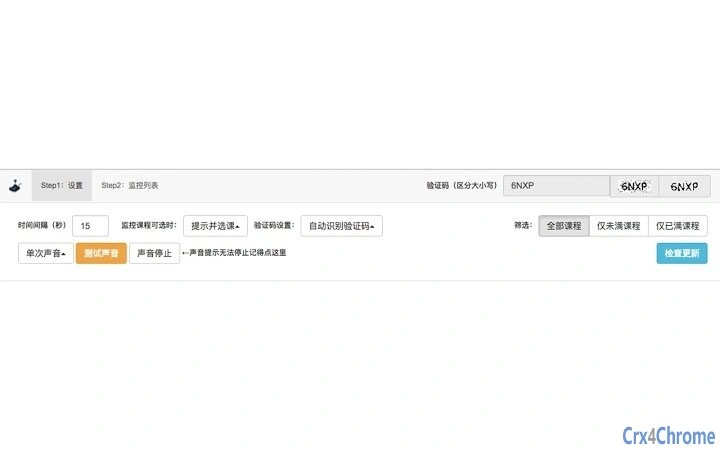
The user interface is designed for simplicity and efficiency, aligning with the expectations of a browser extension. It features a minimalistic control panel accessible directly from the browser toolbar, allowing users to configure monitored courses, set alert preferences, and view status updates. Navigation is intuitive, with clearly labeled options and straightforward input fields for course codes and selection criteria.
Workflow efficiency is optimized for rapid setup and continuous operation. Users can add courses to the monitoring list with minimal clicks, and the tool begins scanning immediately after configuration. The software operates in the background, consuming minimal system resources. The developer did not specify resource usage details, but general behavior suggests low CPU and RAM consumption typical of lightweight browser extensions.
Stability is maintained through consistent background execution, though performance may vary depending on browser performance and network conditions. The tool does not interfere with other browser tabs or processes, ensuring a smooth multitasking experience. No issues related to crashes or freezes were reported in the provided information.
Compatibility & System Requirements
The software is compatible with both Windows and Mac operating systems, supporting the latest versions of major web browsers. It has a file size of 1.5 MB, indicating a lightweight installation. The software version is 1.0, released on May 15, 2024.
Exact system requirements were not listed. Compatibility information was partially provided, with no mention of specific hardware specifications such as processor speed, RAM, or disk space. The developer did not provide additional details on minimum or recommended configurations. Users are advised to ensure their browser is up to date and supports extension functionality for optimal performance.
Pros and Cons
Pros
- Efficiently automates course selection monitoring, saving significant time and effort
- Supports multiple course tracking for strategic enrollment planning
- Lightweight design with minimal system resource usage
- Free to use, making it accessible to all Peking University students
- Designed specifically for the Peking University course selection system
Cons
- Sound notification functionality is limited to Chrome versions 62 and below due to security restrictions
- No official support for mobile platforms
- Dependent on browser extension compatibility, which may vary across browsers
- Limited information on system requirements and performance under heavy load
- Relies entirely on web-based interaction, requiring a stable internet connection
FAQ Section
Is this software compatible with Mac and Windows?
Yes, the software is confirmed to work on both Windows and Mac operating systems.
Can I use this tool without a Chrome browser?
While the tool is designed as a browser extension, its full functionality may be limited in browsers other than Chrome, particularly regarding sound notifications.
Is the software safe to use with my Peking University account?
The software does not collect or store personal data. It operates solely within the browser environment and does not transmit credentials to external servers.
How often does the tool check for course availability?
The tool performs continuous monitoring, checking for changes in real time. The exact frequency is not specified but is optimized for responsiveness.
Does the software require an internet connection?
Yes, the software must remain connected to the internet to monitor the course selection system and deliver notifications.
Final Thoughts + CTA
This automated course selection assistant offers a practical solution for Peking University students navigating the high-pressure environment of online course enrollment. Its ability to monitor multiple courses in real time, combined with instant alerting, significantly improves the likelihood of securing desired classes without constant manual oversight. The lightweight design and free access make it an accessible tool for the entire student body.
While limitations exist—particularly with sound notifications in modern Chrome versions—the core functionality remains robust and effective. The tool is especially valuable during peak registration periods when every second counts. For students seeking a reliable, dedicated assistant during course selection, this software delivers tangible benefits.
Download Automated Course Selection Assistant for Peking University now to take control of your academic planning and reduce the stress of enrollment.







